---
title: About the Company's Shared Accounts
description: If you need to share your accounts with the rest of your company's users in Dataslayer, with the Shared Accounts feature you can do it quickly and easily!
---
[Skip to content](https://support.dataslayer.ai/about-the-companys-shared-accounts#main-content)
- [English](https://support.dataslayer.ai/about-the-companys-shared-accounts)
- [Español](https://support.dataslayer.ai/es/sobre-las-cuentas-compartidas-de-la-compañía)
English
Show submenu for translations
[](https://www.dataslayer.ai/)
Open main navigation
Close main navigation
- - [English](https://support.dataslayer.ai/about-the-companys-shared-accounts)
- [Español](https://support.dataslayer.ai/es/sobre-las-cuentas-compartidas-de-la-compañía)
English
Show submenu for translations
Hello. How can we help you?
- There are no suggestions because the search field is empty.
1. [Knowledge base](https://support.dataslayer.ai/?hsLang=en)
2. [General](https://support.dataslayer.ai/general?hsLang=en)
May 28, 2024
# About the Company's Shared Accounts
## If you need to share your accounts with the rest of your company's users in Dataslayer, with the Shared Accounts feature you can do it quickly and easily!
With this feature, you will automatically share the accounts you want **without having to share your passwords** with other users.
> ### **How to share**
To do this, follow these simple steps:
1\. Log in to our [website](https://app.dataslayer.ai/).
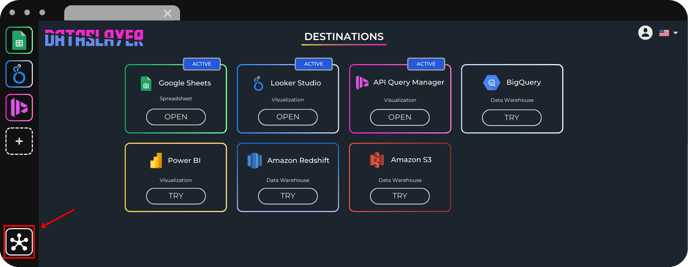
2\. In the main menu, click on the [Hub section](https://app.dataslayer.ai/hub).
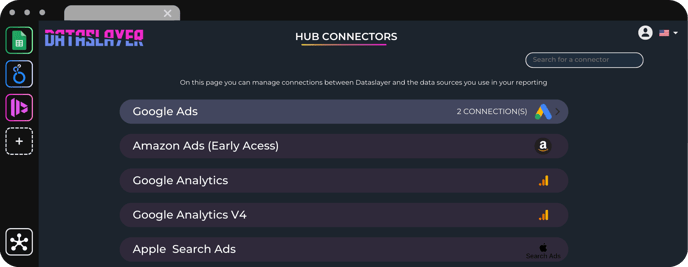
3\. Once in the Hub section, **select the data source** with which you want to share an account.
4\. Here you have two options:
.png?width=688&height=61&name=faqs%20(3).png)
You will only have to **activate the Shared account option** of the account you want to share. The account will be automatically shared and will be available for selection for all users of the company.
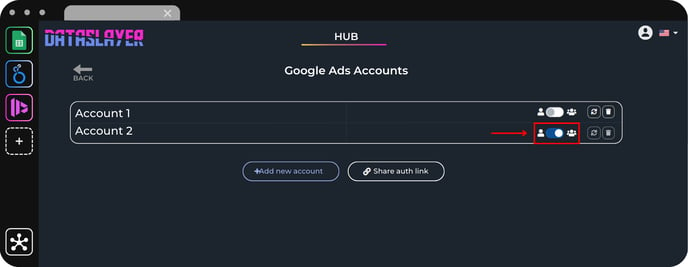

Click on **Add a new account**
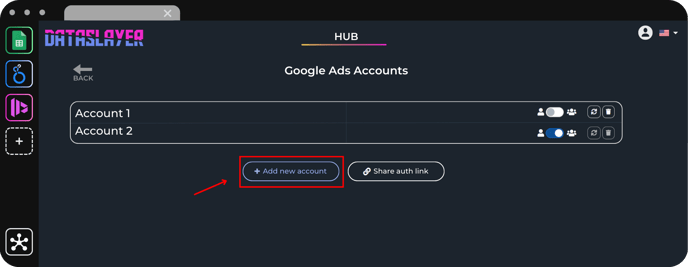
**- Activate the Shared Account** option and log in normally.
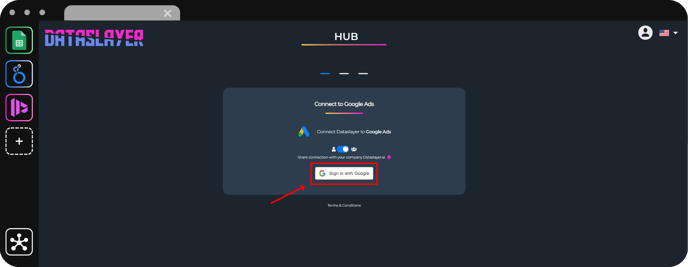
5\. That's it! That's how easy it is to share your account with the rest of your company.
> ### **What happens if the credentials are logged out?**
If the credentials are logged out of the account shared with the company, e.g. because the credentials have expired, the account will be automatically removed.
An email will be sent to the person who shared the account and to the person who tried to use it.
This email will give details of who has shared the account, on which data source, and which account is shared. As well as indicate which user should log in again.
As always, please contact us via the live chat on our [web](http://dataslayer.ai) or via [email](mailto:info@dataslayer.ai) if you still have doubts or questions. We are happy to help!
- [General](https://support.dataslayer.ai/general?hsLang=en)
- [Billing & Pricing](https://support.dataslayer.ai/billing-pricing?hsLang=en)
- [Data Sources](https://support.dataslayer.ai/data-sources?hsLang=en)
- [Blended Connectors](https://support.dataslayer.ai/blended-connectors?hsLang=en)
- [Google Sheets](https://support.dataslayer.ai/google-sheets?hsLang=en)
- [Microsoft Excel](https://support.dataslayer.ai/microsoft-excel?hsLang=en)
- [Spreadsheets](https://support.dataslayer.ai/spreadsheets?hsLang=en)
- [Looker Studio](https://support.dataslayer.ai/looker-studio?hsLang=en)
- [Big Query](https://support.dataslayer.ai/big-query?hsLang=en)
- [API Query Manager](https://support.dataslayer.ai/api-query-manager?hsLang=en)
- [Power BI](https://support.dataslayer.ai/power-bi?hsLang=en)
- [Amazon S3](https://support.dataslayer.ai/amazon-s3?hsLang=en)
- [Amazon Redshift](https://support.dataslayer.ai/amazon-redshift?hsLang=en)
- [Snowflake](https://support.dataslayer.ai/snowflake?hsLang=en#main-content)
- [Marketplace](https://support.dataslayer.ai/snowflake?hsLang=en#marketplace)
- [Google Cloud Storage](https://support.dataslayer.ai/google-cloud-storage?hsLang=en)
- [Database](https://support.dataslayer.ai/database?hsLang=en)
- [Azure SQL](https://support.dataslayer.ai/azure-sql?hsLang=en)
- [Azure Storage](https://support.dataslayer.ai/azure-storage?hsLang=en)
- [Dataslayer Atlas](https://support.dataslayer.ai/dataslayer-atlas?hsLang=en)
- [Morpheus](https://support.dataslayer.ai/morpheus?hsLang=en)
- [AI Looker Studio Analyzer](https://support.dataslayer.ai/ai-looker-studio-analyzer?hsLang=en)
- [Dataslayer MCP](https://support.dataslayer.ai/dataslayer-mcp?hsLang=en)
- [Dataslayer GPT](https://support.dataslayer.ai/dataslayer-gpt?hsLang=en)
- [Dataslayer AI Chat](https://support.dataslayer.ai/dataslayer-ai-chat?hsLang=en)
[](https://dataslayer.ai/)
Dataslayer.ai: Digital Marketing Reporting Made Easy
Copyright © 2026, DATASLAYER SL