---
title: "ChatGPT Ads: Authentication Guide"
description: In this guide, we will walk you through how to authenticate or reauthenticate ChatGPT Ads in Dataslayer.
---
[Skip to content](https://support.dataslayer.ai/chatgpt-ads-authentication-guide#main-content)
- [English](https://support.dataslayer.ai/chatgpt-ads-authentication-guide)
- [Español](https://support.dataslayer.ai/es/chatgpt-ads-authentication-guide)
English
Show submenu for translations
[](https://www.dataslayer.ai/)
Open main navigation
Close main navigation
- - [English](https://support.dataslayer.ai/chatgpt-ads-authentication-guide)
- [Español](https://support.dataslayer.ai/es/chatgpt-ads-authentication-guide)
English
Show submenu for translations
Hello. How can we help you?
- There are no suggestions because the search field is empty.
1. [Knowledge base](https://support.dataslayer.ai/?hsLang=en)
2. [Data Sources](https://support.dataslayer.ai/data-sources?hsLang=en)
July 20, 2026
# ChatGPT Ads: Authentication Guide
## In this article, you'll learn how to connect securely ChatGPT Ads to Dataslayer.
**ChatGPT Ads** is a supported data source within [**Dataslayer**](https://www.dataslayer.ai/), allowing you to access and analyze your ChatGTP Ads account data directly in your reporting workflows. Connecting ChatGPT Ads enables automated data retrieval, streamlined dashboard updates, and consistent visibility into your activity.
Authentication is required to authorize Dataslayer to access your ChatGPT Ads data securely. This process ensures that only approved accounts can connect, protects your information, and allows Dataslayer to retrieve data on your behalf without exposing your credentials.
### **What do I need to authenticate ChatGPT Ads in Dataslayer?**
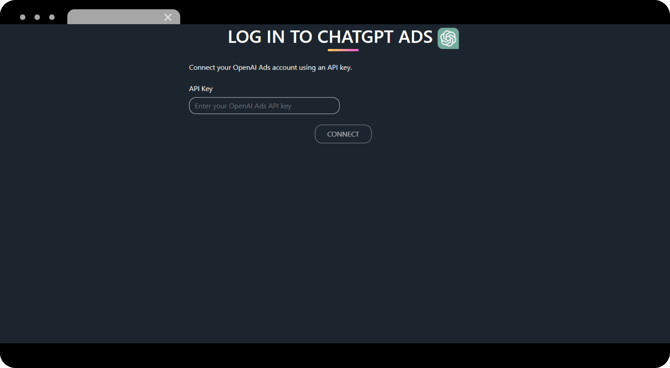
To connect Dataslayer with the ChatGPT Ads data source, you'll need:
- **API Key**
****
#### **How do I generate an ChatGPT Ads Key?**
1. **Access the** [**ChatGPT Ads**](https://ads.openai.com/) site.
2. Once logged in, go to **Settings** andclick on "**+ Create New Key**"
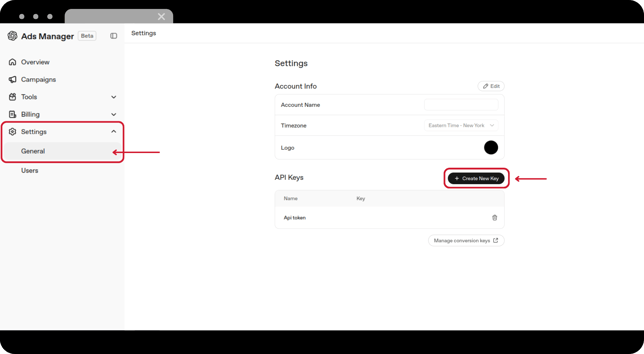
3. **Copy** the newly created **key**.
**Now you have the information needed to make the connection between ChatGPT Ads and Dataslayer!**
### **How do I connect ChatGPT to Dataslayer?**
1. Log in to **[Dataslayer.ai](http://dataslayer.ai/)** and look for the **Data Sources Hub** section in the left menu.
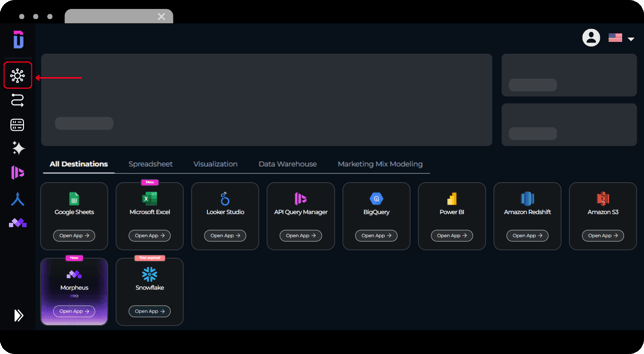
2. Once in there, look for the **ChatGPT Ads** connector.
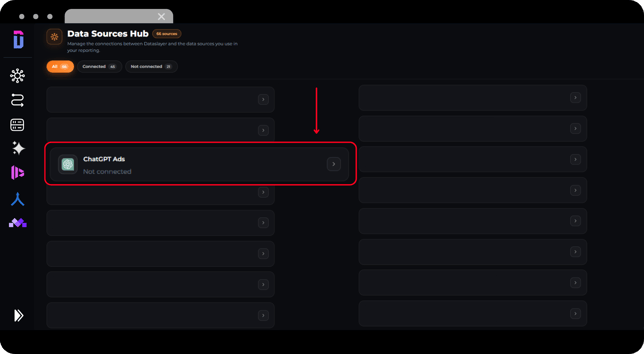
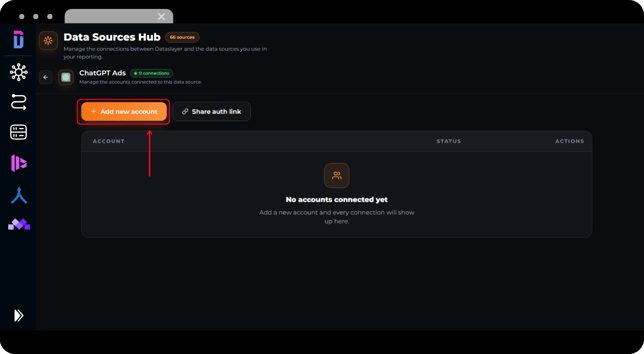
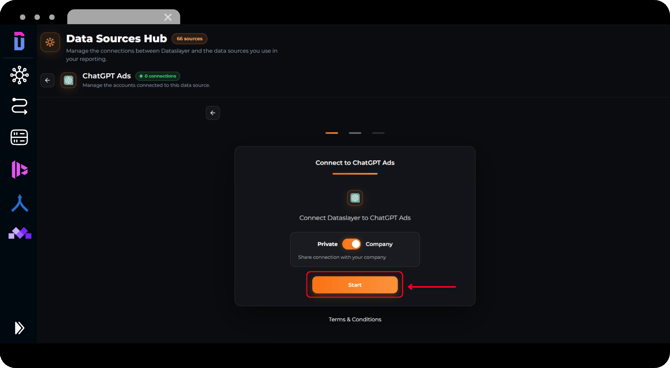
3. Click on "**+ Add new account**" and then click on **Start**.
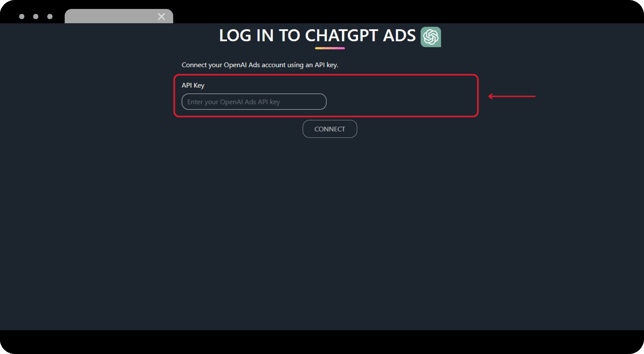
4. Paste your **API Key** into the designated field.
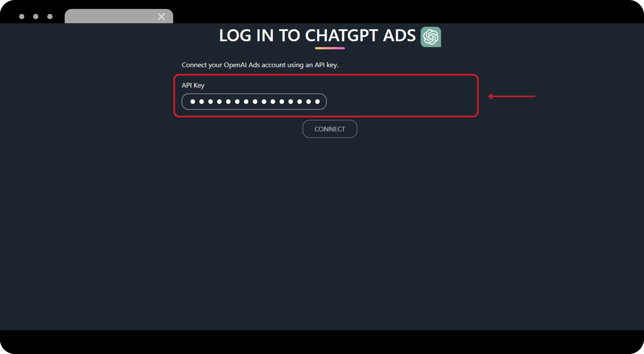
5. With the field completed, click on **Connect**.
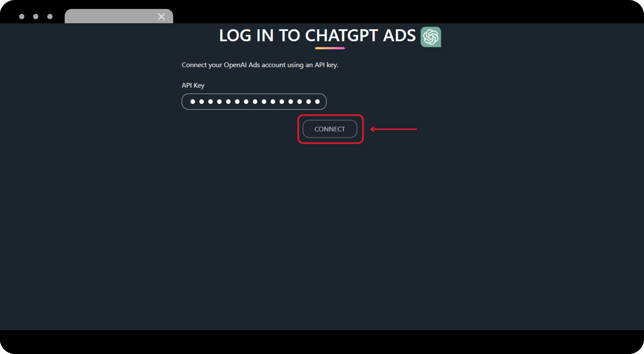
#### Once the connection is successful, your ChatGPT Ads account will appear in **Data Sources Hub** and can be selected when building reports.
If you need to **reauthenticate your connection**, please check [**this article**](https://support.dataslayer.ai/how-to-refresh-your-hub-connection-authorization?hsLang=en) for a detailed walkthrough.
As always, please do not hesitate to contact us via our live chat on [our website](https://dataslayer.ai/?__hstc=205882892.6526bb15cfac7d661ffbfd3c4281267e.1709723421854.1710847825554.1710853493282.26&__hssc=205882892.2.1710853493282&__hsfp=1885414922) or via [e-mail](mailto:info@dataslayer.ai) if you still have doubts or questions. We are happy to help!
- [General](https://support.dataslayer.ai/general?hsLang=en)
- [Billing & Pricing](https://support.dataslayer.ai/billing-pricing?hsLang=en)
- [Data Sources](https://support.dataslayer.ai/data-sources?hsLang=en)
- [Blended Connectors](https://support.dataslayer.ai/blended-connectors?hsLang=en)
- [Google Sheets](https://support.dataslayer.ai/google-sheets?hsLang=en)
- [Microsoft Excel](https://support.dataslayer.ai/microsoft-excel?hsLang=en)
- [Spreadsheets](https://support.dataslayer.ai/spreadsheets?hsLang=en)
- [Looker Studio](https://support.dataslayer.ai/looker-studio?hsLang=en)
- [Big Query](https://support.dataslayer.ai/big-query?hsLang=en)
- [API Query Manager](https://support.dataslayer.ai/api-query-manager?hsLang=en)
- [Power BI](https://support.dataslayer.ai/power-bi?hsLang=en)
- [Amazon S3](https://support.dataslayer.ai/amazon-s3?hsLang=en)
- [Amazon Redshift](https://support.dataslayer.ai/amazon-redshift?hsLang=en)
- [Snowflake](https://support.dataslayer.ai/snowflake?hsLang=en#main-content)
- [Marketplace](https://support.dataslayer.ai/snowflake?hsLang=en#marketplace)
- [Google Cloud Storage](https://support.dataslayer.ai/google-cloud-storage?hsLang=en)
- [Database](https://support.dataslayer.ai/database?hsLang=en)
- [Azure SQL](https://support.dataslayer.ai/azure-sql?hsLang=en)
- [Azure Storage](https://support.dataslayer.ai/azure-storage?hsLang=en)
- [Dataslayer Atlas](https://support.dataslayer.ai/dataslayer-atlas?hsLang=en)
- [Morpheus](https://support.dataslayer.ai/morpheus?hsLang=en)
- [AI Looker Studio Analyzer](https://support.dataslayer.ai/ai-looker-studio-analyzer?hsLang=en)
- [Dataslayer MCP](https://support.dataslayer.ai/dataslayer-mcp?hsLang=en)
- [Dataslayer GPT](https://support.dataslayer.ai/dataslayer-gpt?hsLang=en)
- [Dataslayer AI Chat](https://support.dataslayer.ai/dataslayer-ai-chat?hsLang=en)
[](https://dataslayer.ai/)
Dataslayer.ai: Digital Marketing Reporting Made Easy
Copyright © 2026, DATASLAYER SL