---
title: How to Configure SAML SSO in Dataslayer
description: Learn how to configure SAML 2.0 SSO in Dataslayer with Okta, JumpCloud or another identity provider, test your SSO login and troubleshoot common errors.
---
[Skip to content](https://support.dataslayer.ai/how-to-configure-saml-sso-in-dataslayer#main-content)
- [English](https://support.dataslayer.ai/how-to-configure-saml-sso-in-dataslayer)
- [Español](https://support.dataslayer.ai/es/how-to-configure-saml-sso-in-dataslayer)
English
Show submenu for translations
[](https://www.dataslayer.ai/)
Open main navigation
Close main navigation
- - [English](https://support.dataslayer.ai/how-to-configure-saml-sso-in-dataslayer)
- [Español](https://support.dataslayer.ai/es/how-to-configure-saml-sso-in-dataslayer)
English
Show submenu for translations
Hello. How can we help you?
- There are no suggestions because the search field is empty.
1. [Knowledge base](https://support.dataslayer.ai/?hsLang=en)
2. [General](https://support.dataslayer.ai/general?hsLang=en)
October 2, 2026
# How to Configure SAML SSO in Dataslayer
## Learn how to set up SAML 2.0 Single Sign-On with Okta, JumpCloud or another identity provider, test your SSO login and troubleshoot common errors.
### How SAML SSO Works in Dataslayer
Dataslayer supports Single Sign-On (SSO) through SAML 2.0. This allows users to access Dataslayer using the identity provider configured by their organization, such as Okta or JumpCloud.
In this integration:
- Identity Provider (IdP): the service that authenticates users.
- Service Provider (SP): Dataslayer, the application users want to access.
When a user starts an SSO login from Dataslayer, Dataslayer redirects the request to the organization’s identity provider.
After authentication, the identity provider returns a SAML response to Dataslayer’s Assertion Consumer Service (ACS) URL.
The SAML Response, the Assertion, or both must be signed. Dataslayer validates the signature using the identity provider’s configured public X.509 certificate before granting access to the correct user and company.
Your administrator must configure both sides of the SAML SSO integration.
### What You Need Before Starting
Before configuring SAML SSO, make sure you have:
- Administrator access to your identity provider.
- A Dataslayer account with company Owner or Administrator permissions.
- A corporate email address associated with your Dataslayer company.
- The users already invited and added to the correct Dataslayer company.
- A SAML application assigned to those users or their groups in your identity provider.
SSO configuration does not automatically create users or grant them access to a Dataslayer company. Users must first be added through the regular Dataslayer invitation flow.
### What Dataslayer Values Should I Configure in My Identity Provider?
For a new production integration, use the following values. Replace `company.com` with the domain configured for your Dataslayer company.
| Field | Value |
| --- | --- |
| Audience URI / SP Entity ID | `https://morpheus-api.dataslayer.ai/sso/metadata` |
| ACS URL / Single sign-on URL | `https://morpheus-api.dataslayer.ai/sso/acs?company_domain=company.com` |
| Dataslayer metadata URL | `https://morpheus-api.dataslayer.ai/sso/metadata?company_domain=company.com` |
| Dataslayer SSO login page | `https://app.dataslayer.ai/sso/login` |
For a new integration, use the values published in the Dataslayer metadata for your company whenever possible.
The Audience URI does not include the `company_domain` parameter or a trailing slash.
If your company has not been configured yet and you cannot access the required metadata, please contact Dataslayer Support.
#### Do I Need to Change an Existing ACS URL?
If your existing integration uses:
`https://morpheus-api.dataslayer.ai/sso/acs`
do not change it only because you are reviewing the Audience URI.
For a login initiated from Dataslayer, the company can be recovered from the login request. If you receive a specific Recipient or Destination error, Support should review the URL used in that attempt and compare it with your identity provider configuration.
### Are the Audience URI, ACS URL and IdP Entity ID the Same?
No. Each field has a different purpose.
| Field | What it represents |
| --- | --- |
| Audience URI / SP Entity ID | Identifies Dataslayer as the service provider receiving the authentication. |
| ACS URL / Single sign-on URL | The Dataslayer endpoint that receives the SAML response. |
| IdP Entity ID / Identity Provider Issuer | Identifies your identity provider. |
| IdP SSO URL | The identity provider endpoint where users authenticate. |
For example, an identifier that starts with `http://www.okta.com/` may be the Okta Issuer. It should not be replaced with the Dataslayer metadata URL.
An identifier can start with `http://` without being a webpage. Copy it exactly as published by your identity provider.
### Where Do I Enter the Identity Provider Details in Dataslayer?
1. Log in to your Dataslayer account.
2. Open your profile.
3. Select **SSO Configuration**.
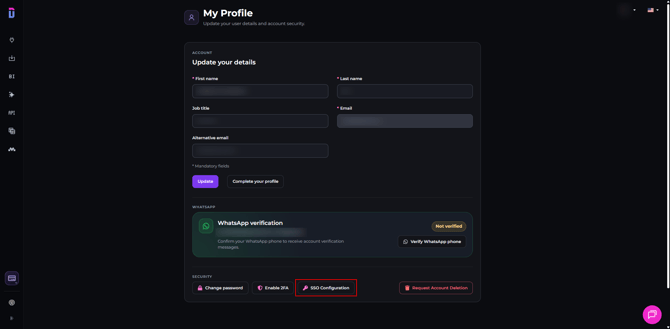
Complete the SAML SSO configuration fields:
| Dataslayer field | What to enter |
| --- | --- |
| Company Domain | Your company domain. This is automatically extracted from the email address of the account configuring SSO. |
| Metadata URL | The URL that publishes the SAML XML metadata for your identity provider application. |
| Entity ID | The identity provider identifier, also called IdP Entity ID or Issuer. |
| SSO Service URL | The identity provider SAML authentication endpoint. |
| SSO Binding | For manual configuration, enter: `urn:oasis:names:tc:SAML:2.0:bindings:HTTP-Redirect` Use the identity provider’s HTTP-Redirect endpoint as the SSO Service URL. When a Metadata URL is configured, Dataslayer reads the binding from the metadata. |
| X509 Certificate | The public X.509 certificate corresponding to the identity provider’s signing key. |
| Restrict login to SSO only for this domain | Enable this option to require SSO for users from this domain. |
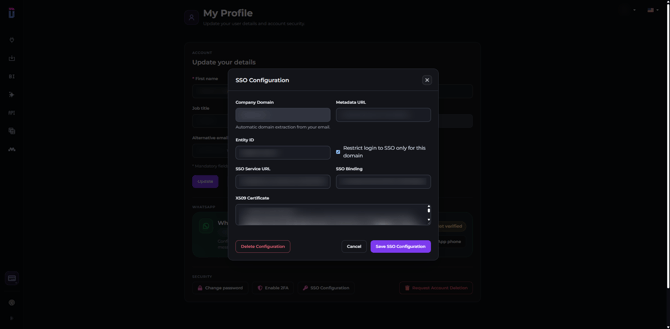
HTTP-Redirect and HTTP-POST are separate directions of the login flow. Use the identity provider’s published HTTP-Redirect endpoint for login requests.
Click **Save SSO Configuration** when you are finished.
If the SSO Configuration option is not available, check that:
- Your account belongs to a Dataslayer company.
- You are the company Owner or Administrator.
- You are using a corporate email address.
### What Should I Enter in the Metadata URL?
Enter the metadata URL of the SAML application configured in your identity provider.
The URL must return SAML XML metadata and be accessible from Dataslayer servers without requiring an administrator session.
Do not enter:
- The identity provider portal login page.
- The Dataslayer ACS URL.
- The Dataslayer metadata URL.
- A temporary link generated during a login attempt.
If a Metadata URL is configured but cannot be retrieved or parsed, SSO login fails. Dataslayer does not automatically fall back to the manually entered values.
When a Metadata URL is configured successfully, Dataslayer uses the Entity ID, SSO endpoint and certificate published in that metadata during the SAML login process.
Make sure the URL belongs to the correct SAML application and is accessible from Dataslayer servers without an administrator session.
### What Email Address Should the Identity Provider Send?
The identity provider should send the email address of the Dataslayer user who belongs to the company.
For the simplest configuration:
- Send the corporate email address as the SAML `NameID`.
- If you also send an email attribute, use the `email` attribute with the same value.
- First name and last name attributes are optional.
- Do not send only an internal username that does not match the Dataslayer account email.
### Which Certificate Do I Need?
The SAML Response, the Assertion, or both must be signed using the identity provider’s private signing key.
Dataslayer verifies the signature using the corresponding public X.509 certificate configured for your identity provider.
Only provide the public certificate to Dataslayer. Never share the private key.
### How Do I Configure SAML SSO in Okta?
In the SAML application configuration in Okta:
1. Enter the Dataslayer Audience URI in **Audience URI (SP Entity ID)**.
2. Enter the corresponding Dataslayer ACS URL in **Single sign-on URL**.
3. If **Recipient URL** and **Destination URL** are configured separately, make sure they are consistent with the ACS URL.
4. Obtain the Okta metadata, Issuer, SSO endpoint and public signing certificate.
5. Enter those values in Dataslayer under **SSO Configuration**.
6. Assign the application to the required users or groups.
The exact field names may vary depending on your Okta configuration.
### How Do I Configure SAML SSO in JumpCloud?
Create a custom SAML 2.0 application in JumpCloud:
1. Enter the Dataslayer value in **SP Entity ID**.
2. Enter the corresponding Dataslayer ACS URL in **ACS URLs**.
3. Configure the SAML `NameID` with the user’s corporate email address.
4. Assign the application to the required users or groups.
5. Export or copy the application’s metadata.
6. Enter the metadata URL and identity provider details in Dataslayer.
### Does the Identity Provider Region Matter?
Yes. Make sure that the account, application and metadata belong to the correct organization and region.
Use the endpoints published by your SAML application. Do not manually add or remove `.eu` or another regional suffix to try to correct a URL.
If the metadata publishes an unexpected endpoint, review the application configuration with your identity provider administrator.
### How Do I Test the SSO Login?
1. Keep your Dataslayer administration session open.
2. Open a private browsing window or a separate browser profile.
3. Go directly to `https://app.dataslayer.ai/sso/login`.
4. Enter your company domain.
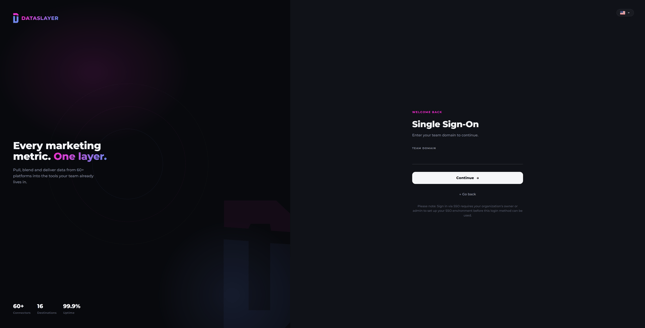
5. Complete authentication with your identity provider in the same browser window.
6. Confirm that you return to Dataslayer with the correct user account and company.
7. Only enable **Restrict login to SSO only for this domain** after confirming that the test succeeds.
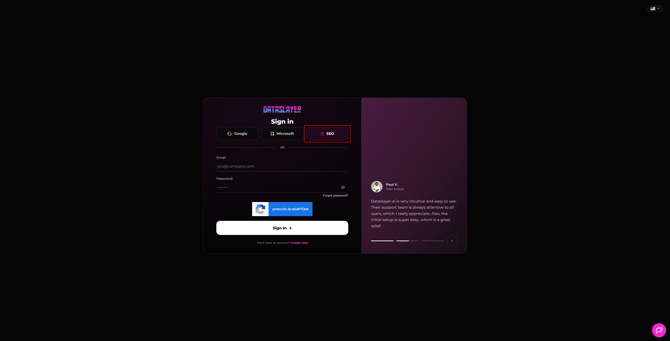
If you access the standard Dataslayer sign-in page first, select the SSO option to open the Team Domain screen.
#### Can I Start the Login by Clicking the Application in My Identity Provider Portal?
SSO must be initiated from Dataslayer. IdP-initiated SAML login, without a preceding Dataslayer login request, is not supported.
To provide access from your corporate portal, link to:
`https://app.dataslayer.ai/sso/login`
### Why Do I Need to Start a New Login Attempt After an Error?
Each login attempt uses temporary, single-use state that expires after ten minutes.
After an error:
1. Return to the Dataslayer SSO login page.
2. Start a new login attempt.
3. Complete the process in the same browser.
4. Avoid starting several attempts in different tabs.
5. Do not reuse old links or resubmit previous SAML forms.
### What Happens If the SAML Metadata and Manual Fields Are Different?
A successfully retrieved Metadata URL has priority over the manually entered values. Manual fields do not override the Entity ID, SSO endpoint or certificate published in the metadata.
If the Metadata URL cannot be retrieved or parsed, SSO login fails. Dataslayer does not automatically use the manually entered values as a fallback.
If you replace the SAML application, review its metadata and signing certificate as well.
### Troubleshooting Common SAML SSO Errors
| Symptom | What to check |
| --- | --- |
| “Domain not configured for SSO” | Make sure you entered the correct company domain and saved the SSO configuration in Dataslayer. |
| “SSO login could not be started” | Check that the Metadata URL is accessible and contains the correct metadata, endpoint and Issuer. |
| The identity provider rejects the credentials | Make sure you are using a valid user account in the identity provider. The administrator account may be different from the test user. |
| The application does not appear or access is denied | Make sure the SAML application is assigned to the user or group. |
| You authenticate successfully but do not return to Dataslayer | Make sure the login was initiated from Dataslayer and that the application and ACS URL are correct. |
| Audience URI error | Make sure the Audience URI matches exactly: `https://morpheus-api.dataslayer.ai/sso/metadata` |
| Recipient or Destination error | Make sure the response is sent to the correct ACS URL and that the destination fields are consistent. |
| Signature or certificate error | Make sure the Response or Assertion is signed and that the configured certificate matches the certificate used by the identity provider. |
| Invalid or expired state | Start a new login attempt from Dataslayer and complete it in the same browser. |
| The account does not belong to the company | Make sure the user exists in Dataslayer, belongs to the correct company and that the identity provider sends the correct email address. |
| Generic SSO failure | Contact Support with the exact time of the attempt so the specific cause can be identified. |
A generic error message does not, by itself, confirm that the Audience URI is incorrect.
### What Information Does Support Need?
When contacting Support, include:
- Company domain.
- Identity provider name.
- Exact date and time of the failed attempt, including the time zone.
- Error message or screenshot.
- Whether the error occurs before authentication or after returning to Dataslayer.
- Audience URI and ACS URL configured in the identity provider.
- Any recent changes to the SAML application, metadata or certificate.
Share the affected email address only through a private Support channel.
Never send:
- Passwords.
- Private keys.
- Cookies.
- Session tokens.
- Complete SAML responses.
### Should I Use the Same Values in Testing and Production?
No. The URLs in this article are production values.
For a test environment, request the correct values from Dataslayer Support and use a separate SAML integration. Do not mix the Audience URI from one environment with the ACS URL from another.
As always, please contact us via our live chat on our website or via email ([info@dataslayer.ai](mailto:info@dataslayer.ai)) if you still have doubts or questions. We are happy to help!
- [General](https://support.dataslayer.ai/general?hsLang=en)
- [Billing & Pricing](https://support.dataslayer.ai/billing-pricing?hsLang=en)
- [Data Sources](https://support.dataslayer.ai/data-sources?hsLang=en)
- [Blended Connectors](https://support.dataslayer.ai/blended-connectors?hsLang=en)
- [Google Sheets](https://support.dataslayer.ai/google-sheets?hsLang=en)
- [Microsoft Excel](https://support.dataslayer.ai/microsoft-excel?hsLang=en)
- [Spreadsheets](https://support.dataslayer.ai/spreadsheets?hsLang=en)
- [Looker Studio](https://support.dataslayer.ai/looker-studio?hsLang=en)
- [Big Query](https://support.dataslayer.ai/big-query?hsLang=en)
- [API Query Manager](https://support.dataslayer.ai/api-query-manager?hsLang=en)
- [Power BI](https://support.dataslayer.ai/power-bi?hsLang=en)
- [Amazon S3](https://support.dataslayer.ai/amazon-s3?hsLang=en)
- [Amazon Redshift](https://support.dataslayer.ai/amazon-redshift?hsLang=en)
- [Snowflake](https://support.dataslayer.ai/snowflake?hsLang=en#main-content)
- [Marketplace](https://support.dataslayer.ai/snowflake?hsLang=en#marketplace)
- [Google Cloud Storage](https://support.dataslayer.ai/google-cloud-storage?hsLang=en)
- [Database](https://support.dataslayer.ai/database?hsLang=en)
- [Azure SQL](https://support.dataslayer.ai/azure-sql?hsLang=en)
- [Azure Storage](https://support.dataslayer.ai/azure-storage?hsLang=en)
- [Dataslayer Atlas](https://support.dataslayer.ai/dataslayer-atlas?hsLang=en)
- [Morpheus](https://support.dataslayer.ai/morpheus?hsLang=en)
- [AI Looker Studio Analyzer](https://support.dataslayer.ai/ai-looker-studio-analyzer?hsLang=en)
- [Dataslayer MCP](https://support.dataslayer.ai/dataslayer-mcp?hsLang=en)
- [Dataslayer GPT](https://support.dataslayer.ai/dataslayer-gpt?hsLang=en)
- [Dataslayer AI Chat](https://support.dataslayer.ai/dataslayer-ai-chat?hsLang=en)
[](https://dataslayer.ai/)
Dataslayer.ai: Digital Marketing Reporting Made Easy
Copyright © 2026, DATASLAYER SL