---
title: How to refresh your Hub connection authorization
description: Experiencing unexpected logouts, permission issues, the error "Some of your hub connections have expired. Please refresh the authorization." or something similar?
---
[Skip to content](https://support.dataslayer.ai/how-to-refresh-your-hub-connection-authorization#main-content)
- [English](https://support.dataslayer.ai/how-to-refresh-your-hub-connection-authorization)
- [Español](https://support.dataslayer.ai/es/cómo-actualizar-la-autorización-de-conexión-al-hub)
English
Show submenu for translations
[](https://www.dataslayer.ai/)
Open main navigation
Close main navigation
- - [English](https://support.dataslayer.ai/how-to-refresh-your-hub-connection-authorization)
- [Español](https://support.dataslayer.ai/es/cómo-actualizar-la-autorización-de-conexión-al-hub)
English
Show submenu for translations
Hello. How can we help you?
- There are no suggestions because the search field is empty.
1. [Knowledge base](https://support.dataslayer.ai/?hsLang=en)
2. [General](https://support.dataslayer.ai/general?hsLang=en)
June 25, 2025
# How to refresh your Hub connection authorization
## Experiencing unexpected logouts, permission issues, the error "Some of your hub connections have expired. Please refresh the authorization." or something similar?
### Learn how to reauthenticate your credentials with the Dataslayer Hub!
Reauthentication solves such issues, ensuring continuous and smooth access to your connectors.
To do it, just follow these steps:
1\. Log into the [Dataslayer website](https://dataslayer.ai/).

2\. Once logged in, click on the **[Hub section](https://app.dataslayer.ai/hub)**.
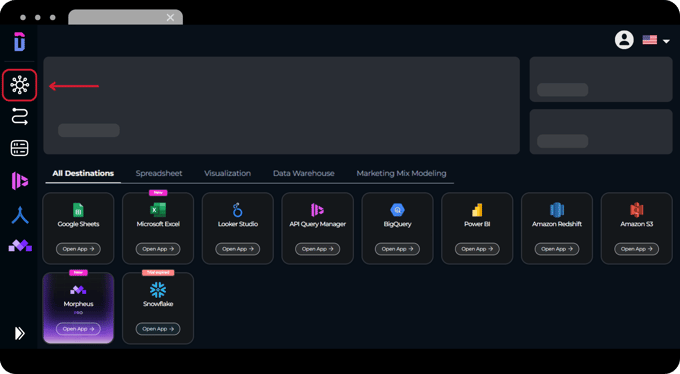
3\. Select the data source of the account you want to refresh.

4\. Here you have two possibilities:
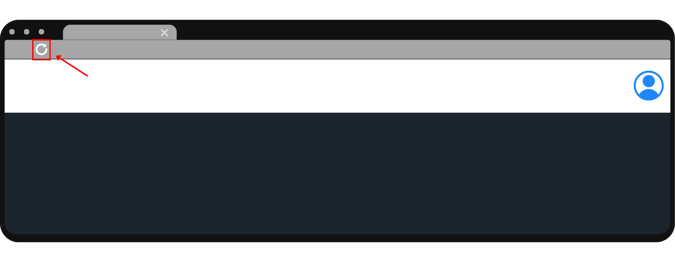
- a. If you **see the account**, click on the **refresh icon** next to the account.

- b. If you **do not see the account**, click the **"Add new account" button**.

5\. Follow the steps to **sign in again**.
.png?width=680&height=374&name=NEW%20UI%202025%20-%20About%20the%20Hub%20%20refresh%20credentials%20(1).png)
6\. Once done, you can close the Hub page and **refresh the browser** of Looker Studio or the product you were working with.
### That's it! Now you have refreshed your Hub connection authorization and you can continue working as properly.
As always, please do not hesitate to contact us via our live chat on [our website](https://dataslayer.ai/?__hstc=205882892.6526bb15cfac7d661ffbfd3c4281267e.1709723421854.1710847825554.1710853493282.26&__hssc=205882892.2.1710853493282&__hsfp=1885414922) or via [e-mail](mailto:info@dataslayer.ai) if you still have doubts or questions. We are happy to help!
- [General](https://support.dataslayer.ai/general?hsLang=en)
- [Billing & Pricing](https://support.dataslayer.ai/billing-pricing?hsLang=en)
- [Data Sources](https://support.dataslayer.ai/data-sources?hsLang=en)
- [Blended Connectors](https://support.dataslayer.ai/blended-connectors?hsLang=en)
- [Google Sheets](https://support.dataslayer.ai/google-sheets?hsLang=en)
- [Microsoft Excel](https://support.dataslayer.ai/microsoft-excel?hsLang=en)
- [Spreadsheets](https://support.dataslayer.ai/spreadsheets?hsLang=en)
- [Looker Studio](https://support.dataslayer.ai/looker-studio?hsLang=en)
- [Big Query](https://support.dataslayer.ai/big-query?hsLang=en)
- [API Query Manager](https://support.dataslayer.ai/api-query-manager?hsLang=en)
- [Power BI](https://support.dataslayer.ai/power-bi?hsLang=en)
- [Amazon S3](https://support.dataslayer.ai/amazon-s3?hsLang=en)
- [Amazon Redshift](https://support.dataslayer.ai/amazon-redshift?hsLang=en)
- [Snowflake](https://support.dataslayer.ai/snowflake?hsLang=en#main-content)
- [Marketplace](https://support.dataslayer.ai/snowflake?hsLang=en#marketplace)
- [Google Cloud Storage](https://support.dataslayer.ai/google-cloud-storage?hsLang=en)
- [Database](https://support.dataslayer.ai/database?hsLang=en)
- [Azure SQL](https://support.dataslayer.ai/azure-sql?hsLang=en)
- [Azure Storage](https://support.dataslayer.ai/azure-storage?hsLang=en)
- [Dataslayer Atlas](https://support.dataslayer.ai/dataslayer-atlas?hsLang=en)
- [Morpheus](https://support.dataslayer.ai/morpheus?hsLang=en)
- [AI Looker Studio Analyzer](https://support.dataslayer.ai/ai-looker-studio-analyzer?hsLang=en)
- [Dataslayer MCP](https://support.dataslayer.ai/dataslayer-mcp?hsLang=en)
- [Dataslayer GPT](https://support.dataslayer.ai/dataslayer-gpt?hsLang=en)
- [Dataslayer AI Chat](https://support.dataslayer.ai/dataslayer-ai-chat?hsLang=en)
[](https://dataslayer.ai/)
Dataslayer.ai: Digital Marketing Reporting Made Easy
Copyright © 2026, DATASLAYER SL