---
title: Understanding the Dataslayer Manage Queries view
description: We have changed the user interface in our Google Sheets extension. Now managing queries is much easier and faster!
---
[Skip to content](https://support.dataslayer.ai/understanding-the-dataslayer-manage-queries-view#main-content)
- [English](https://support.dataslayer.ai/understanding-the-dataslayer-manage-queries-view)
- [Español](https://support.dataslayer.ai/es/entendiendo-el-menú-de-consulta-de-dataslayer)
English
Show submenu for translations
[](https://www.dataslayer.ai/)
Open main navigation
Close main navigation
- - [English](https://support.dataslayer.ai/understanding-the-dataslayer-manage-queries-view)
- [Español](https://support.dataslayer.ai/es/entendiendo-el-menú-de-consulta-de-dataslayer)
English
Show submenu for translations
Hello. How can we help you?
- There are no suggestions because the search field is empty.
1. [Knowledge base](https://support.dataslayer.ai/?hsLang=en)
2. [Google Sheets](https://support.dataslayer.ai/google-sheets?hsLang=en)
May 27, 2024
# Understanding the Dataslayer Manage Queries view
## We have changed the user interface in our Google Sheets extension. Now managing queries is much easier and faster!
If you are a bit lost or don't understand well the meaning of each of the icons and their functions, don't worry! Keep reading to find out more about our amazing and super-intuitive Manage Queries menu.
1\. First, in Google Sheets, open the Dataslayer extension.
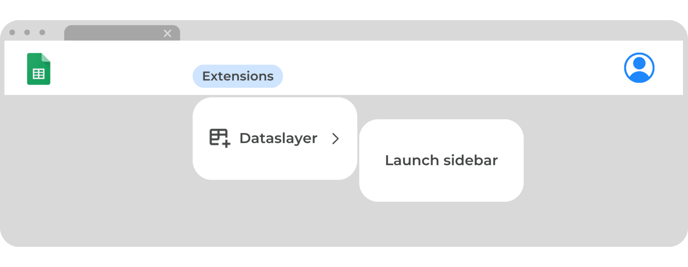
2\. Once in our extension, you will see all the queries that the document has.
**Learn [here](https://support.dataslayer.ai/how-to-make-a-simple-query?hsLang=en) how to create a simple query with Dataslayer.**
3\. You will be able to manage your queries and create new ones from our extension.
### The Dataslayer query icons
.png?width=688&height=252&name=Browser%20template%20(9).png)
As you can see, this menu has several options. Here is an explanation of what each one does:
- **Refresh:** the arrow icon refreshes the query data. This will consume 1 API call.
- **Modify:** the pencil icon allows you to modify the query parameters. After making the changes, click on "confirm changes" to apply them.
**Learn more about modifying a query [here](https://support.dataslayer.ai/how-can-i-modify-a-pre-existing-query?hsLang=en).**
- **Duplicate:** the duplicate icon copies the query data to the Dataslayer sidebar. Once this option is clicked, select a blank cell and click on "generate query" to generate an identical query.
- **Report this query:** in case of an error or any other problem, the message icon will allow the Dataslayer technical team to review your query code (but not your data) and fix it. Tell us what's happening, submit your report and you will have an answer within the next 24 hours.
**Learn more about reporting a query [here](https://support.dataslayer.ai/how-to-report-an-issue-with-a-query-in-google-sheets?hsLang=en).**
- **Delete query & data:** the paper bin icon deletes the query code and its data.
- **Query information:** The arrow next to the paper bin shows all the query information.
### In addition to these icons, we have more options in the three dots next to the data source logo:
-1.png?width=688&height=252&name=Browser%20template%20(10)-1.png)
- **Show params:** will take you to the query code in the hidden sheet "DataslayerQueries"
- **Go to results:** this will take you to the results of the query itself.
- **Delete Query:** deletes the query code of the hidden sheet "DataslayerQueries", but not its data.
As always, please contact us via our live chat on our [website](https://dataslayer.ai/) or via [email](mailto:info@dataslayer.ai) if you still have doubts or questions. We are happy to help!
- [General](https://support.dataslayer.ai/general?hsLang=en)
- [Billing & Pricing](https://support.dataslayer.ai/billing-pricing?hsLang=en)
- [Data Sources](https://support.dataslayer.ai/data-sources?hsLang=en)
- [Blended Connectors](https://support.dataslayer.ai/blended-connectors?hsLang=en)
- [Google Sheets](https://support.dataslayer.ai/google-sheets?hsLang=en)
- [Microsoft Excel](https://support.dataslayer.ai/microsoft-excel?hsLang=en)
- [Spreadsheets](https://support.dataslayer.ai/spreadsheets?hsLang=en)
- [Looker Studio](https://support.dataslayer.ai/looker-studio?hsLang=en)
- [Big Query](https://support.dataslayer.ai/big-query?hsLang=en)
- [API Query Manager](https://support.dataslayer.ai/api-query-manager?hsLang=en)
- [Power BI](https://support.dataslayer.ai/power-bi?hsLang=en)
- [Amazon S3](https://support.dataslayer.ai/amazon-s3?hsLang=en)
- [Amazon Redshift](https://support.dataslayer.ai/amazon-redshift?hsLang=en)
- [Snowflake](https://support.dataslayer.ai/snowflake?hsLang=en#main-content)
- [Marketplace](https://support.dataslayer.ai/snowflake?hsLang=en#marketplace)
- [Google Cloud Storage](https://support.dataslayer.ai/google-cloud-storage?hsLang=en)
- [Database](https://support.dataslayer.ai/database?hsLang=en)
- [Azure SQL](https://support.dataslayer.ai/azure-sql?hsLang=en)
- [Azure Storage](https://support.dataslayer.ai/azure-storage?hsLang=en)
- [Dataslayer Atlas](https://support.dataslayer.ai/dataslayer-atlas?hsLang=en)
- [Morpheus](https://support.dataslayer.ai/morpheus?hsLang=en)
- [AI Looker Studio Analyzer](https://support.dataslayer.ai/ai-looker-studio-analyzer?hsLang=en)
- [Dataslayer MCP](https://support.dataslayer.ai/dataslayer-mcp?hsLang=en)
- [Dataslayer GPT](https://support.dataslayer.ai/dataslayer-gpt?hsLang=en)
- [Dataslayer AI Chat](https://support.dataslayer.ai/dataslayer-ai-chat?hsLang=en)
[](https://dataslayer.ai/)
Dataslayer.ai: Digital Marketing Reporting Made Easy
Copyright © 2026, DATASLAYER SL