---
title: Understanding the LinkedIn Pages new behavior
description: Have you noticed that you are missing data when using the "Date" metric, or any other strange behavior with the LinkedIn Pages connector?
---
[Skip to content](https://support.dataslayer.ai/understanding-the-linkedin-pages-new-behavior#main-content)
- [English](https://support.dataslayer.ai/understanding-the-linkedin-pages-new-behavior)
- [Español](https://support.dataslayer.ai/es/entendiendo-el-nuevo-comportamiento-de-linkedin-pages)
English
Show submenu for translations
[](https://www.dataslayer.ai/)
Open main navigation
Close main navigation
- - [English](https://support.dataslayer.ai/understanding-the-linkedin-pages-new-behavior)
- [Español](https://support.dataslayer.ai/es/entendiendo-el-nuevo-comportamiento-de-linkedin-pages)
English
Show submenu for translations
Hello. How can we help you?
- There are no suggestions because the search field is empty.
1. [Knowledge base](https://support.dataslayer.ai/?hsLang=en)
2. [Data Sources](https://support.dataslayer.ai/data-sources?hsLang=en)
May 29, 2024
# Understanding the LinkedIn Pages new behavior
## Have you noticed that you are missing data when using the "Date" metric, or any other strange behavior with the LinkedIn Pages connector?
Since February 2023, LinkedIn Pages has changed its behavior and added new metrics and dimensions. See more info about this [here](https://support.dataslayer.ai/linkedin-pages-api-field-changes-from-february-2023?hsLang=en).
> ### How does the new LinkedIn Pages connector work?
Learn how this integration works and some things about it that you may not know yet.
**1. Only posts that have had any interaction in the selected date range are displayed.**
When you select a date range **you WILL NOT see all the posts of that date range**, you will only see the post that had any interaction in that selected date range.
**2. If the total metrics are used, all posts in the selected date range are displayed.**
As its name indicates, total metrics show the **total of the selected metrics**, so all the posts of the selected date range will appear.
%20(3).png?width=688&height=344&name=Browser%20template%20(1800%20x%20900%20px)%20(3).png)
**Total metrics on our Google Sheets extension**
.png?width=688&height=362&name=Browser%20template%20(1253%20x%20659%20px).png)
**Total metrics on our Looker Studio connector**
**3. Total metrics and normal metrics CANNOT be combined.**
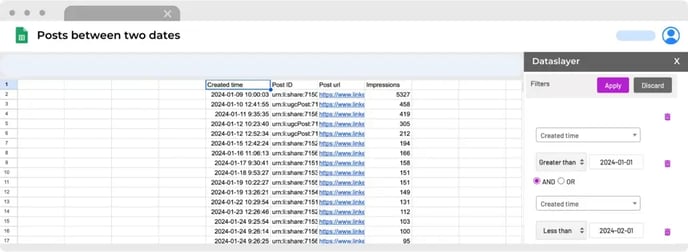
**4. The "Created time" metric shows the date and time in which the post was created. Note that it won't correspond to the selected date range if total metrics are not used.**
As mentioned in previous points, the date range won't display all the posts in that range, only the ones which had any interaction, unless you use the total metrics.
**Tip: if you want to see the posts between two dates with the results of their metrics on those same dates you should select the filter configuration below.**
**5. The "Date" metric shows the date on which the interaction occurred.**
Unless you use the total metrics. Keep in mind that if you use the total metrics, the **Date** dimension will import the same results as the **Created time** dimension, but without the hour.
**6. The "Total Reactions" metric always displays the total reactions of each post.**
This means they sum up all like + celebrate + support + love + insightful + funny.
**7. If you make a query with likes or comments metrics and a time dimension (without post id, url, ...) the values displayed are the organic ones.**
As always, please do not hesitate to contact us via our live chat on [our website](https://dataslayer.ai/?__hstc=205882892.6526bb15cfac7d661ffbfd3c4281267e.1709723421854.1709899115717.1710148803745.8&__hssc=205882892.8.1710148803745&__hsfp=1885414922) or via [e-mail](mailto:info@dataslayer.ai) if you still have doubts or questions. We are happy to help!
- [General](https://support.dataslayer.ai/general?hsLang=en)
- [Billing & Pricing](https://support.dataslayer.ai/billing-pricing?hsLang=en)
- [Data Sources](https://support.dataslayer.ai/data-sources?hsLang=en)
- [Blended Connectors](https://support.dataslayer.ai/blended-connectors?hsLang=en)
- [Google Sheets](https://support.dataslayer.ai/google-sheets?hsLang=en)
- [Microsoft Excel](https://support.dataslayer.ai/microsoft-excel?hsLang=en)
- [Spreadsheets](https://support.dataslayer.ai/spreadsheets?hsLang=en)
- [Looker Studio](https://support.dataslayer.ai/looker-studio?hsLang=en)
- [Big Query](https://support.dataslayer.ai/big-query?hsLang=en)
- [API Query Manager](https://support.dataslayer.ai/api-query-manager?hsLang=en)
- [Power BI](https://support.dataslayer.ai/power-bi?hsLang=en)
- [Amazon S3](https://support.dataslayer.ai/amazon-s3?hsLang=en)
- [Amazon Redshift](https://support.dataslayer.ai/amazon-redshift?hsLang=en)
- [Snowflake](https://support.dataslayer.ai/snowflake?hsLang=en#main-content)
- [Marketplace](https://support.dataslayer.ai/snowflake?hsLang=en#marketplace)
- [Google Cloud Storage](https://support.dataslayer.ai/google-cloud-storage?hsLang=en)
- [Database](https://support.dataslayer.ai/database?hsLang=en)
- [Azure SQL](https://support.dataslayer.ai/azure-sql?hsLang=en)
- [Azure Storage](https://support.dataslayer.ai/azure-storage?hsLang=en)
- [Dataslayer Atlas](https://support.dataslayer.ai/dataslayer-atlas?hsLang=en)
- [Morpheus](https://support.dataslayer.ai/morpheus?hsLang=en)
- [AI Looker Studio Analyzer](https://support.dataslayer.ai/ai-looker-studio-analyzer?hsLang=en)
- [Dataslayer MCP](https://support.dataslayer.ai/dataslayer-mcp?hsLang=en)
- [Dataslayer GPT](https://support.dataslayer.ai/dataslayer-gpt?hsLang=en)
- [Dataslayer AI Chat](https://support.dataslayer.ai/dataslayer-ai-chat?hsLang=en)
[](https://dataslayer.ai/)
Dataslayer.ai: Digital Marketing Reporting Made Easy
Copyright © 2026, DATASLAYER SL