---
title: Understanding the Sync Frequencies in the Amazon RedShift Destination
description: When uploading data to Amazon RedShift, we can find different options depending on our needs.
---
[Skip to content](https://support.dataslayer.ai/understanding-the-sync-frequencies-in-the-amazon-redshift-destination#main-content)
- [English](https://support.dataslayer.ai/understanding-the-sync-frequencies-in-the-amazon-redshift-destination)
- [Español](https://support.dataslayer.ai/es/entendiendo-las-frecuencias-de-sincronización-en-amazon-redshift)
English
Show submenu for translations
[](https://www.dataslayer.ai/)
Open main navigation
Close main navigation
- - [English](https://support.dataslayer.ai/understanding-the-sync-frequencies-in-the-amazon-redshift-destination)
- [Español](https://support.dataslayer.ai/es/entendiendo-las-frecuencias-de-sincronización-en-amazon-redshift)
English
Show submenu for translations
Hello. How can we help you?
- There are no suggestions because the search field is empty.
1. [Knowledge base](https://support.dataslayer.ai/?hsLang=en)
2. [Amazon Redshift](https://support.dataslayer.ai/amazon-redshift?hsLang=en)
May 17, 2024
# Understanding the Sync Frequencies in the Amazon RedShift Destination
## When uploading data to Amazon RedShift, we can find different options depending on our needs.
### That is why we have different Sync Frequencies that we are going to explain in this article so you can learn the different options we have when transferring our information using Dataslayer.
#### Schedule option
Select this option to **schedule periodic uploads**. Ideal for keeping the data updated periodically.
**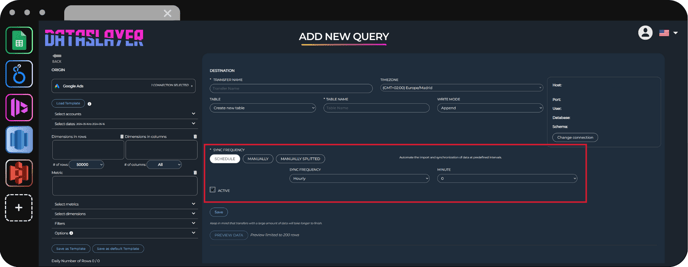Schedule Option**
#### Manual option
If you have a **small volume of data** (one month, or one year with a small amount of information): You can use the manual option for an immediate upload of your data. The manual option works in such a way that it uploads all the data at once.
**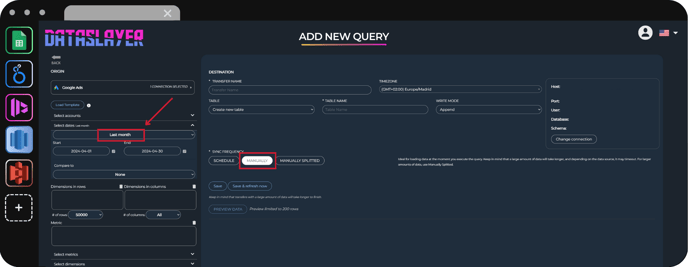One-Month date range**
#### Manually Splitted option
If you have a **large volume of data** (a month with a lot of data and many accounts, or more than a year): You can use the manually splitted option. To avoid timeouts, interruptions, and errors, this function divides the queries by groups and executes them periodically, so that the data will be uploaded little by little in an uninterrupted way.
**Important: Note that this function can ONLY be executed when the query has TEMPORAL DIMENSIONS added.**
**When this option is used, the query can take a long time, so once executed, even if the browser is closed, the query will continue to run.**
**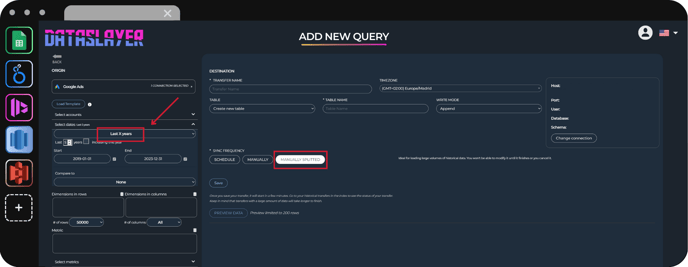Five-years date range**
As always, please contact us via our live chat on our website or via email if you still have doubts or questions. We are happy to help!
- [General](https://support.dataslayer.ai/general?hsLang=en)
- [Billing & Pricing](https://support.dataslayer.ai/billing-pricing?hsLang=en)
- [Data Sources](https://support.dataslayer.ai/data-sources?hsLang=en)
- [Blended Connectors](https://support.dataslayer.ai/blended-connectors?hsLang=en)
- [Google Sheets](https://support.dataslayer.ai/google-sheets?hsLang=en)
- [Microsoft Excel](https://support.dataslayer.ai/microsoft-excel?hsLang=en)
- [Spreadsheets](https://support.dataslayer.ai/spreadsheets?hsLang=en)
- [Looker Studio](https://support.dataslayer.ai/looker-studio?hsLang=en)
- [Big Query](https://support.dataslayer.ai/big-query?hsLang=en)
- [API Query Manager](https://support.dataslayer.ai/api-query-manager?hsLang=en)
- [Power BI](https://support.dataslayer.ai/power-bi?hsLang=en)
- [Amazon S3](https://support.dataslayer.ai/amazon-s3?hsLang=en)
- [Amazon Redshift](https://support.dataslayer.ai/amazon-redshift?hsLang=en)
- [Snowflake](https://support.dataslayer.ai/snowflake?hsLang=en#main-content)
- [Marketplace](https://support.dataslayer.ai/snowflake?hsLang=en#marketplace)
- [Google Cloud Storage](https://support.dataslayer.ai/google-cloud-storage?hsLang=en)
- [Database](https://support.dataslayer.ai/database?hsLang=en)
- [Azure SQL](https://support.dataslayer.ai/azure-sql?hsLang=en)
- [Azure Storage](https://support.dataslayer.ai/azure-storage?hsLang=en)
- [Dataslayer Atlas](https://support.dataslayer.ai/dataslayer-atlas?hsLang=en)
- [Morpheus](https://support.dataslayer.ai/morpheus?hsLang=en)
- [AI Looker Studio Analyzer](https://support.dataslayer.ai/ai-looker-studio-analyzer?hsLang=en)
- [Dataslayer MCP](https://support.dataslayer.ai/dataslayer-mcp?hsLang=en)
- [Dataslayer GPT](https://support.dataslayer.ai/dataslayer-gpt?hsLang=en)
- [Dataslayer AI Chat](https://support.dataslayer.ai/dataslayer-ai-chat?hsLang=en)
[](https://dataslayer.ai/)
Dataslayer.ai: Digital Marketing Reporting Made Easy
Copyright © 2026, DATASLAYER SL